

Download Inkline on the App Store → Out now for iPhone. 7 day free trial, then £14.99 a year.
I built Inkline: a new RSS reader for iOS, made for people who track the news for a living. Comms professionals, journalists, analysts, anyone who needs to follow a lot of sources without the bloat, the paywalls, or the algorithm standing in the way.
Why I built it
RSS is the internet’s plumbing. It sits behind almost every website you read, publishing a feed of updates the moment new content goes live. It costs nothing to use. It answers to no algorithm. It has no opinion on what you should think. You choose the sources. The sources tell you when they’ve published something new. That’s the whole transaction, and for two decades it’s been one of the most useful, least appreciated pieces of infrastructure on the web.
Google Reader made this genuinely mainstream for a while. Google shut it down on 1 July 2013, citing declining usage. What filled the gap was a small cluster of companies, none of them built by people who’ve had to file copy on deadline or explain to a client why a piece of coverage matters.
They charge a monthly subscription for the privilege of reading things that are already free. They cap the number of feeds you can track, as though information itself were a premium tier. And more recently, they’ve bolted on AI summarisation features that add very little beyond a bullet-pointed paraphrase of an article you were about to read anyway.
People who work in media want more than a stream of headlines. They want to save the article that matters for the report they’re writing that afternoon. They want to jot a note next to it while the thought is fresh. They want to send it to a colleague on WhatsApp, drop it into a Slack channel, or paste it into a Teams thread without leaving the app. These are the daily mechanics of the job, and the RSS incumbents have largely ignored them.
Twitter and Facebook arrived and offered something that looked similar to RSS: a feed of things to read, curated and delivered to you. Attention moved there, and RSS became a niche interest for people who already knew what they were looking for.
The bargain hasn’t held up. Social feeds are built by algorithms whose incentive is engagement, and engagement is reliably maximised by outrage. You get bubbles, advertising wedged between every third post, and less of the people you actually chose to follow. Increasingly, you get content that isn’t fit for a screen you might have open in an office. RSS never had these problems. It tells you the truth about what’s been published, in the order it was published, from sources you picked yourself.
Some background
Inkline has been a side project for a long while. Before public relations, I thought my career was heading toward computer science. University changed that; PR won out, and computer science stayed with me as a hobby, worked on in whatever spare time I could find.
Coding alongside an AI model has sped up what I can build in an evening or a weekend, and that has genuinely rekindled a passion for the computer science path I set aside years ago. Getting Inkline through App Store review and watching it go live still feels slightly unreal. I keep checking it’s actually there.
The £14.99 a year covers hosting and the hours I put into building and maintaining it, evenings and weekends. If it ever earns meaningfully more than that, I’ll allocate some surplus aside in a pot for journalism and PR charities I care about.
A reader, not a browser with a feed list
Most RSS apps hand you a headline and then quietly hand you off to the website. You tap, a web view opens, and you’re back in the world of cookie banners, newsletter interstitials, autoplaying video and a paragraph of text somewhere underneath it all.
Inkline doesn’t do that. Articles are rendered natively, in the app, in typography you control. There’s no embedded browser, no chrome, no consent modal between you and the words. And because the article is in the app rather than on a website, it’s available offline: everything in your feed is cached to the device, so a tunnel, a plane, or a bad signal in a client’s basement meeting room doesn’t stop you reading.
That distinction sounds small. In practice it’s the whole experience.
The same principle runs through how Inkline sits inside iOS itself, rather than beside it:
Widgets. The latest from your feeds on your home screen or lock screen, without opening anything.
Siri Shortcuts and App Intents. Inkline’s actions are exposed to the system, so you can wire it into your own automations.
A Share Extension. Subscribe to a site’s feed from Safari without hunting for the RSS URL, and clip an article into Inkline from anywhere on the device.
Spotlight search. Your saved articles and notes are indexed by iOS, so they turn up in system search alongside everything else — which matters when you half-remember reading something three weeks ago and need it now.
What’s in Inkline
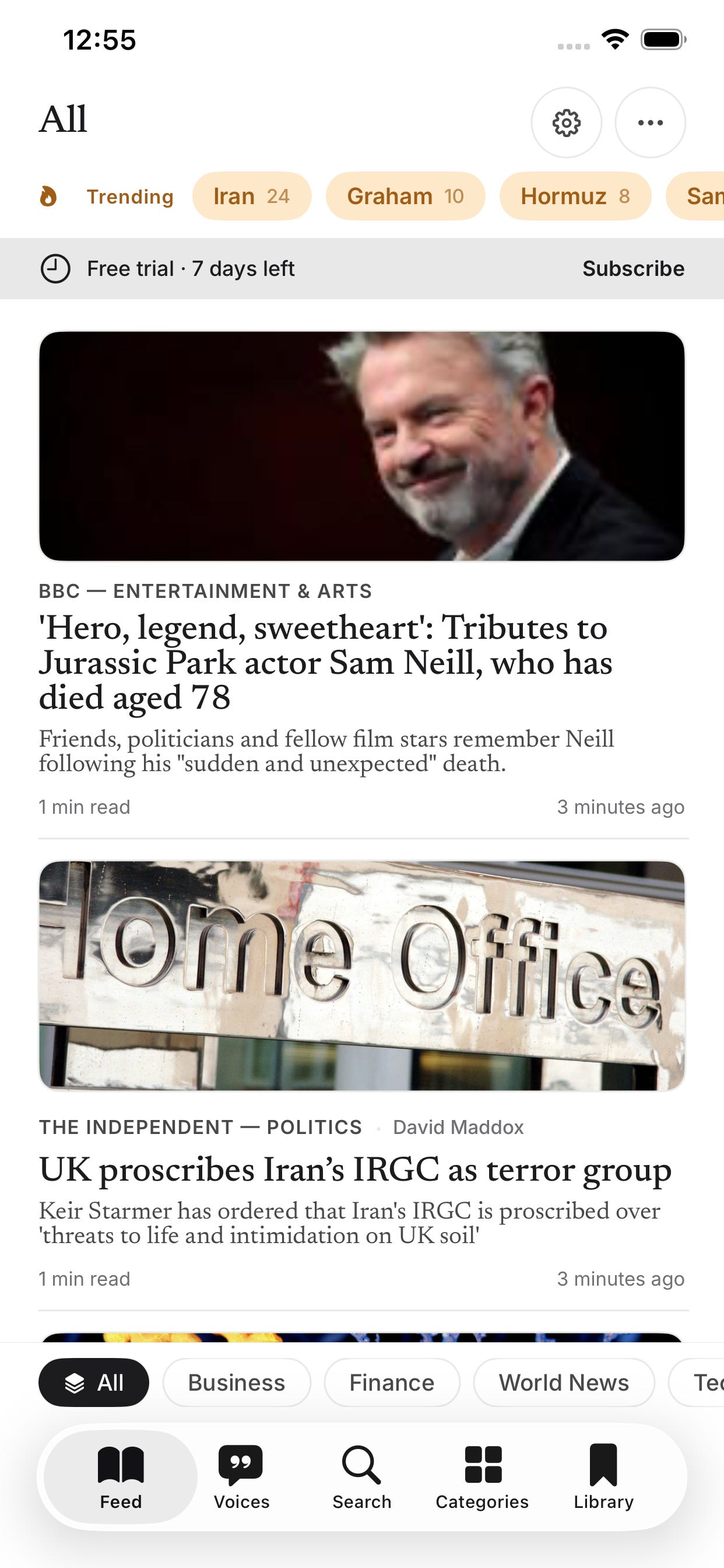
A feed of news, easy to manage. Pull to refresh, scroll, read, remove. No algorithmic reordering of what you see first.
Unlimited feeds. No artificial ceiling designed to nudge you into a higher paid tier.
A search engine for finding feeds. Adding a new source is built around a pre-populated feed search, so you’re not hunting for RSS URLs by hand. Dormant feeds get filtered out automatically, so you’re not left following sites that stopped publishing years ago.
Track journalists, not just publications. Follow individual bylines and see everything they’ve written pulled into your feed, useful for keeping tabs on the specific reporters covering your sector.
Notifications beyond RSS. Set up push notifications that monitor the wider web for a name, company, or topic, similar to a Google News alert, so you catch coverage that never had an RSS feed to begin with.
Trending topics from your own feeds. The trending panel is built from the sources you actually follow, not the internet’s general trending list, so what surfaces is relevant to your beat rather than whatever’s viral that day.
Pre-seeded categories. Finance, Business, Technology, Healthcare, Culture, World News, Science, and Politics, each with a curated starting list of feeds, so the app is useful the moment you open it.
OPML import. Bring an existing subscription list across from another reader in one go.
Notebook, built in. A swipe on any article opens a note against it, so you can capture a quote or a thought while it’s fresh. Notes are searchable and exportable.
Share where the story needs to go. Clean sharing to WhatsApp, Slack, and Teams.
Built for reading properly. A choice of typefaces including Newsreader, Inter, and OpenDyslexic, five-step text sizing with independent line spacing, and four colour modes: Light, Sepia, Dark, and High Contrast. Accessibility is a first-class feature here, on the same footing as everything else in the app.
Your data stays yours. Feeds sync privately via iCloud. Nothing is sold, profiled, or fed into a recommendation engine.
Pricing
Inkline is £14.99 a year, with a 7-day free trial to see if it fits how you actually read. That single annual payment covers hosting and ongoing development, as explained above.
If you download it, I’d genuinely appreciate a review on the App Store, and if you hit a bug or want a feature that isn’t there yet, tell me. I’m building this in the evenings and at weekends, so updates won’t be instant, but they will be steady, and reader feedback is the main thing that will shape where it goes next.